Fun Is Mandatory
Fun Is Mandatory
An Amusement Park Incremental
Pick people up. Build a park. Catch the escapees.
Welcome to Fun Is Mandatory.
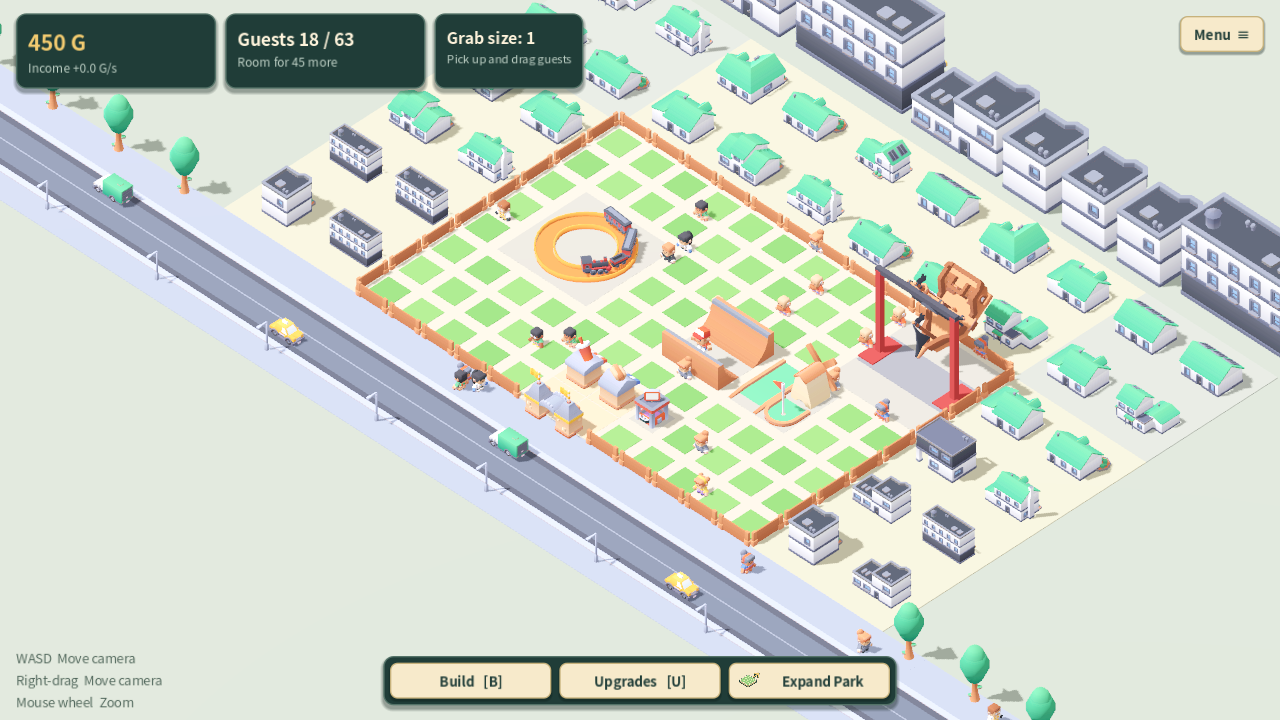
Grab guests, build attractions, upgrade your net, and expand your little amusement park.
Guests can get bored and climb over the fence, so keep an eye on them!
Before you play
The web version is not fully optimized and may run slowly, especially as the park gets busier.
For smoother gameplay, download the Windows version below.
Play in your browser or download for Windows.
Basic mobile touch controls are available in landscape mode. Mobile performance may be limited.
Tell me what you think
I would love to hear what you think about the game.
What felt confusing or slow?
If you could change one thing, what would it be?
Leave a comment below, or on the YouTube video or X post where you found the game.
PC controls
- Left mouse drag: pick up and move guests.
- WASD / right mouse drag: move the camera.
- Mouse wheel: zoom.
- B: build. U: upgrades. More options: Menu.
Mobile controls
- Drag a guest: pick them up and move them.
- Drag empty ground: move the camera.
- Pinch with two fingers: zoom.
- Building: choose a facility, tap a spot to preview it, then tap Place. Use the on-screen Rotate and Cancel buttons as needed.
Tutorial & language
A short tutorial starts on your first visit.
Replay it from Menu without losing your park.
English is the default.
Change it in Menu → Language / 언어.
Browser saves
Progress is saved in this browser for this site.
Use Menu → Save Progress before closing the game.
Private browsing or clearing site data can remove your save.
Browser saves do not transfer to the Windows version.
한국어 안내
사람을 잡아 데려오고, 공원을 키우고, 도망가는 손님을 다시 잡으세요.
Fun Is Mandatory는 사람을 직접 잡아 데려오는 놀이공원 인크리멘탈 게임입니다.
기구를 늘리고 땅을 넓혀보세요.
지루해진 손님은 울타리를 넘어 도망가기도 합니다.
플레이 전 안내
아직 웹 최적화가 충분하지 않아, 손님과 시설이 많아지면 렉이나 프레임 저하가 발생할 수 있습니다.
더 원활한 플레이를 원하시면 아래에서 Windows 버전을 다운로드해 주세요.
PC·모바일 브라우저 / Windows 다운로드
모바일은 가로 화면에서 기본 터치 조작을 지원합니다. 기기에 따라 렉이 있을 수 있습니다.
의견을 들려주세요
게임을 플레이해 본 여러분의 의견을 듣고 싶습니다.
어디가 헷갈리거나 답답했나요?
딱 하나만 바꾼다면 무엇을 바꾸고 싶으신가요?
이 페이지나 게임을 소개한 유튜브 영상·X 게시글에 댓글로 알려주세요.
PC 조작법
- 마우스 왼쪽 드래그: 사람 잡고 옮기기
- WASD / 마우스 오른쪽 드래그: 화면 이동
- 마우스 휠: 확대·축소
- B: 건설 / U: 업그레이드 / 기타 설정: 메뉴
모바일 조작법
- 사람을 누른 채 드래그: 사람 잡고 옮기기
- 빈 땅 드래그: 화면 이동
- 두 손가락 벌리기·오므리기: 확대·축소
- 건설: 시설을 고른 뒤 땅을 터치해 미리 보고, 배치 버튼으로 확정하세요. 회전·취소는 화면 버튼으로 할 수 있습니다.
튜토리얼과 언어
처음 실행하면 튜토리얼이 시작됩니다.
메뉴에서 기존 진행을 유지한 채 다시 체험할 수 있습니다.
기본 언어는 영어입니다.
Menu → Language / 언어에서 한국어로 바꿀 수 있습니다.
웹판 저장 안내
기록은 같은 사이트·브라우저에 저장됩니다.
닫기 전 메뉴 → 진행 저장을 눌러 주세요.
비공개 모드나 사이트 데이터 삭제 시 기록이 사라질 수 있습니다.
웹 기록은 Windows판으로 자동 이전되지 않습니다.
Download
Install instructions
Windows: Extract the entire ZIP, then run FunIsMandatory.exe. Keep FunIsMandatory.pck beside the EXE. No installation is required. Browser saves do not transfer to this version.
Windows: ZIP 파일 전체를 압축 해제한 뒤 FunIsMandatory.exe를 실행하세요. FunIsMandatory.pck 파일을 EXE와 같은 폴더에 두세요. 별도 설치는 필요하지 않습니다. 웹판 저장 기록은 자동으로 이어지지 않습니다.
Leave a comment
Log in with itch.io to leave a comment.